The product

Configure the system your work needs. Keep the controls regulators expect.

Qualsted is a no-code workspace for regulated records: your team designs tables, forms, pages and workflows, and every one of them gets signatures, versions, an audit trail and access control automatically.

Build

Tables, forms and views, without code.

Organize work in folders, then build tables from 28 column types: text, numbers and currency, dates, people, choices, files, links between tables, formulas, rollups, progress, signatures and system fields such as IDs and where each record came from.
  • Start from 17 templates, or from a blank table
  • Form templates with defaults, required fields and starter content; pick one to open with the New button
  • Views: table, board, calendar, timeline and gallery; filters, sorting by up to three columns, and grouped tables
  • Links between tables, shown on both sides (“Linked from”)
  • Dashboards with charts on any page
  • CSV and Excel import that checks every row first, and runs in the background
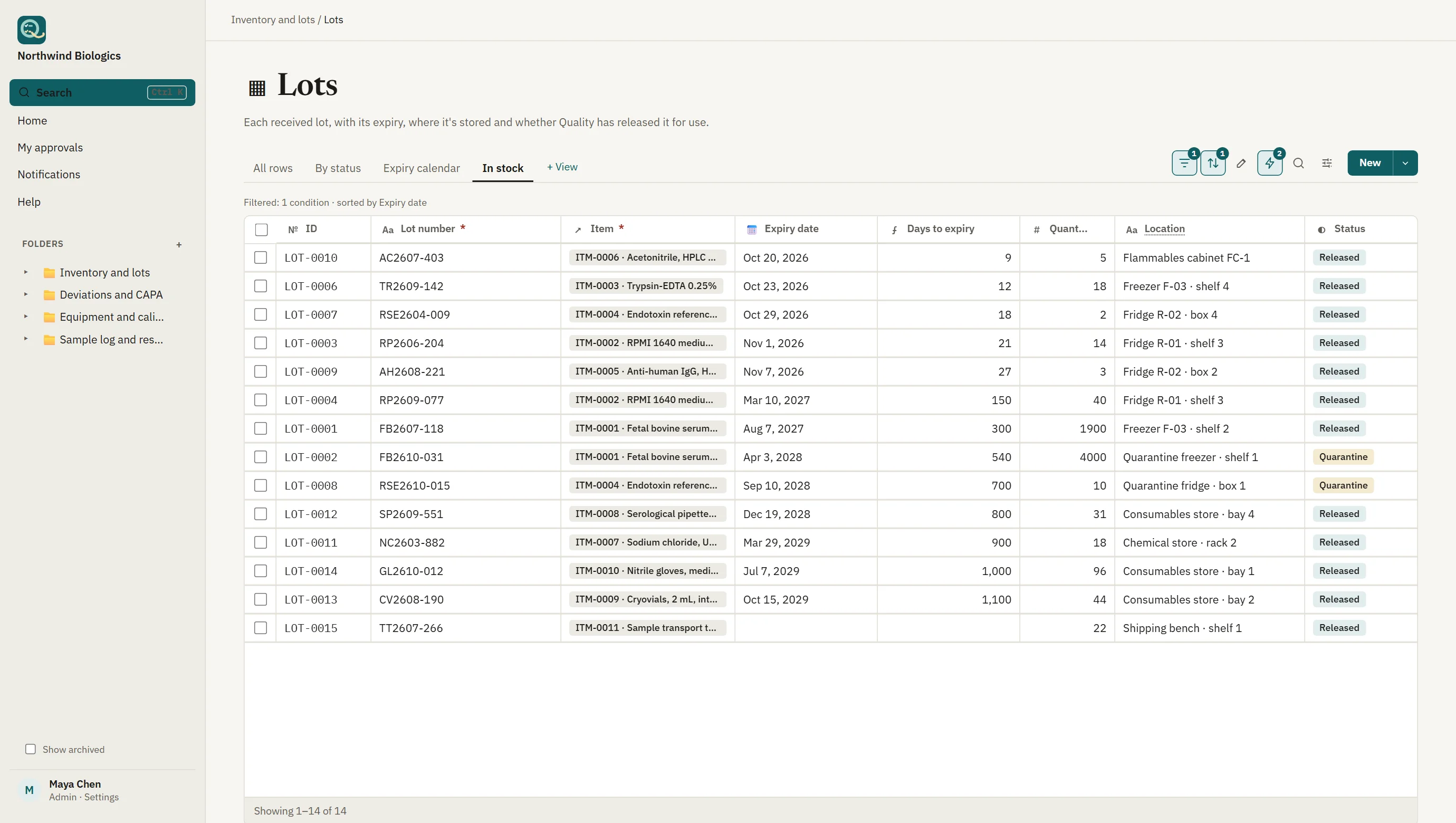
A table of lots in the product: each row links to its item, with expiry date, calculated days to expiry, quantity, storage location and a status chip.
A table you built. Typed columns, a link to another table, a formula and a filtered, sorted view.
Text version of this video
  1. Lots in stock, soonest expiry first.
  2. Days to expiry is a formula, calculated for you.
  3. The same records shown as a board by status.
  4. The same records shown as a calendar by expiry date.
  5. Every view is saved with the table.
Table, board and calendar. One set of records, shown the way you need it, with filters and sorting saved with each view.

Clip and screens show sample data from a fictional company.

Pages

Instructions, checklists and records, together.

Pages hold the procedure and the work: text and headings, to-do lists, live tables, charts, files, and a record submission card that adds records to a table from the page.

  • To-dos stamped with who ticked them and when, by the server
  • A progress column that counts a record's ticked to-dos
  • Embedded tables showing just the columns you choose
  • Every page change in the audit trail; PDFs of the page with its records
Pages / Monthly calibration
Monthly calibrationProgress 1 of 2
✓
Check reference weights' certificatesDone by A. Silva · 08:41 EDT
2
Calibrate each balance and record it belowWaiting
EquipmentResultNext due
BAL-004PassNov 06
BAL-007PassNov 06
Comments and reminders

The conversation and the deadlines, on the record.

Comments and @mentions

Discuss a record or page where it lives. Mention someone to notify them; reply in threads and resolve them. Edits keep the earlier text, and every comment is in the audit trail.

Reminders before things fall due

Automations that run on a date (7 days before Due, the day calibration expires) or on a schedule (every Monday, every month), at a time of day in your time zone.

Rules that do the routine

When a record is created, edited or approved: set a value, notify people, set a date, create a linked record. Each run is recorded, with the reason when one fails.

AI assistant · add-on

Answers, charts and summaries, with nothing decided for you.

Ask how to do anything, ask about your tables, get a chart from a sentence, summarize a long record, describe a filter in words, or get columns suggested for a new table.

  • Reads only what the person asking may see, through their own permissions
  • Never signs, approves or changes a record; suggestions are applied by people
  • Every use logged for admins (who, what, when, whether it was used)
  • Seats for the people who'll use it, $15 per user/month

More about the assistant

Filter · CAPA log

open CAPAs due this month owned by me

Stage is none of Closed · Due on or after Oct 1 · Due on or before Oct 31 · Owner includes me

Check, then Apply
Signatures and review

Electronic signatures that hold up to inspection.

Add signature columns to any table and arrange them into a review workflow. Qualsted enforces who may sign, in what order, and what they're signing.
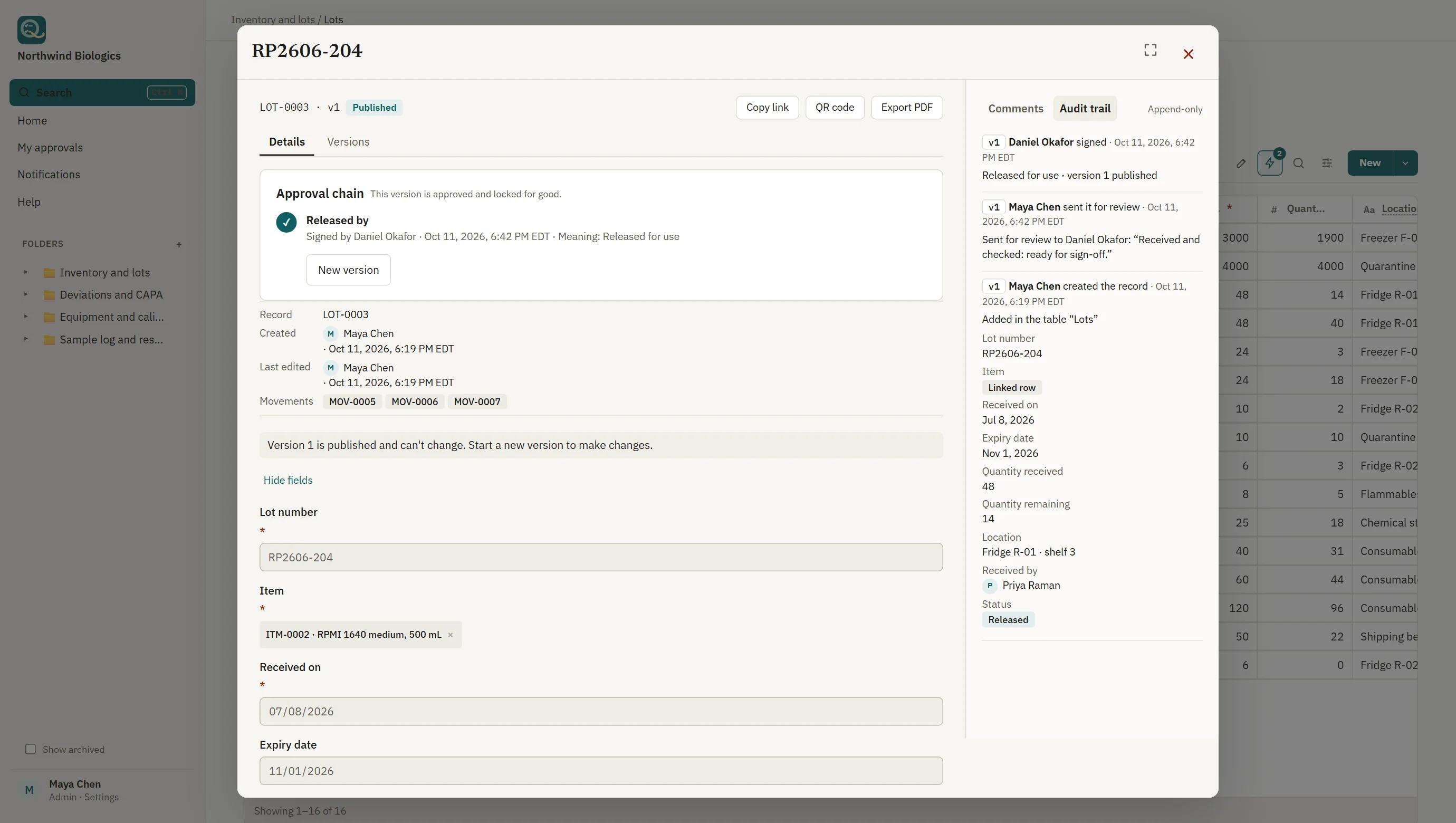
  • The signer's printed name, date and time, and meaning on every signature
  • A fresh password, or a new single sign-on, at the moment of signing
  • Signers from the step's group; authors and senders can't sign their own work
  • Each signature linked to a hash of the exact content signed
  • Records lock in review; approval publishes a version that never changes
  • Reviewers notified in the app and by email, as each person chooses
A released lot: the approval chain shows it signed by a second person with the meaning Released for use, the version published and locked, and an append-only audit trail of who did what and when.
Signed, locked, and on the record. The author can't sign their own record.
Audit trail and history

A complete history that nobody can rewrite.

Every creation, change, archive, signature, permission change and sign-in is recorded with who, when, and the values before and after.

Append-only, by the database

The audit trail accepts new entries only. Database triggers reject any edit or deletion, whoever attempts it, and time stamps come from the server.

History on every record

Anyone who can see a record can see its history, including files that were removed (and restore them, if they can edit).

Trails for review

Workspace, table and page audit trails filter by who, what and item, so a periodic review takes minutes, not days.

Records and copies

Accurate copies for inspectors, partners and auditors.

Controlled PDFs

Made on the server with searchable text, your logo, photos and links to attachments; each states who printed it and when, and that the electronic record is the controlled version.

Exports and backups you can trust

CSV exports of exactly what the reader sees, safely quoted against spreadsheet formula injection. Admins get a nightly backup to keep: every table as CSV, pages as PDFs and the attached files, with checksums. Every export, backup and download is audited.

Sharing outside the workspace

Public links to attachments that expire in 1 to 30 days, can be withdrawn at any time, and record every use.

Connect

Part of your systems, not another island.

A documented API

Read and write records from your ERP, LIMS or scripts with API keys made by admins. A key acts as one person with exactly their access, can be read-only, expires, and can never sign. Described in OpenAPI.

Webhooks, Slack and Teams

Be told when records are created, edited, sent for review or approved: signed JSON for your own systems, or a message in a Slack or Microsoft Teams channel, with the record's values.

Your identity provider

Single sign-on with Entra ID, Okta or Google on every plan. On Enterprise, require it for everyone and let SCIM add, update and deactivate people and groups.

Scan

From the label to the record in one scan.

Every record has a QR code. Print labels for equipment, samples and material lots, then scan them with a phone camera or a handheld scanner to open the record.

  • Print one label, or a sheet for every selected record
  • Scan supplier barcodes (including GS1 lot and serial) to find the matching records
  • Only people who can see the record can open it
Scan
Scanned: (01)09506000134352(10)L-2291
Lot
L-2291
Found
LOT-0412 Housing, part 40-118 · Material lots
People and access

The right access for every person, checked on every request.

Give each person a level that applies everywhere (Read only, Edit records, Manage or Admin), and override it on any folder, table or page, for a person or a group.

  • Items you can't see are invisible, not just locked
  • Two-step sign-in by default; single sign-on with Entra ID, Okta or Google, on every plan
  • Enterprise: single sign-on required for everyone, and SCIM provisioning
  • Free read-only seats for viewers and auditors
  • Accounts are deactivated, never deleted; emails are never reused
Permissions · Quality
WhoLevelWhere
Quality managers (group)ManageWhole folder
Lab technicians (group)Edit recordsNonconformances, CAPA
Customer auditorRead onlyAudit reports
SalesNo accessSupplier files
See it with your own process

Bring one workflow. We'll build it with you in the demo.